


OJO Safeguard · Canada
PlayOJO Self-Exclusion
Every break tool PlayOJO offers Canadian players, from a gentle deposit limit to a six-month self-exclusion, with where to find each one in My Account and what actually happens after you press confirm.
- 24h to 7d cooling-off
- 6 months minimum
- 3 deposit limits
How to close your PlayOJO account
Closing an account and self-excluding sound like the same thing, but PlayOJO treats them as two different requests, and it pays to pick the right one.
To close your PlayOJO account, log in and open live chat, which is staffed 24/7. Tell the agent you want the account closed. Closing runs through support rather than a menu option, and honestly I think that is a good thing: a short chat gives you a moment to say why, and if the reason is gambling itself, the agent can point you to the stronger tools below.
Self-exclusion is built for a different job. It is a protective block with a minimum length, it covers other accounts on the same licence, and it stops deposits and play for the whole period. A closed account is just closed.
Closing fits when
- You are moving on to other hobbies
- You have finished with online casinos for now
- Gambling is not causing you any trouble
- You are happy to ask via live chat
Self-exclusion fits when
- You feel play is getting out of hand
- You want a lock you cannot undo on a whim
- Other accounts on the licence should be blocked too
- You want marketing to stop as well
Not sure which one you need? PlayOJO has a self-assessment test that takes under 60 seconds and needs no login. If you answer yes to two or more questions, treat that as a sign to reach out for support and pick self-exclusion over a simple closure.
PlayOJO deposit limits
A deposit limit is the tool I would set up on day one, before the first spin, while your head is completely clear.
Go to My Account, then Deposit Limits. You can set a daily, a weekly and a monthly cap, and each one works on its own, so you can run one, two or all three at the same time. Most people I know use a monthly figure that matches their fun budget and a daily one that stops a single bad evening from eating the lot.
The rule that makes these limits work: lowering a limit takes effect instantly, while raising one only applies after 24 hours. That delay is the whole point. If you want more money in the account at midnight, you will have to still want it tomorrow night.
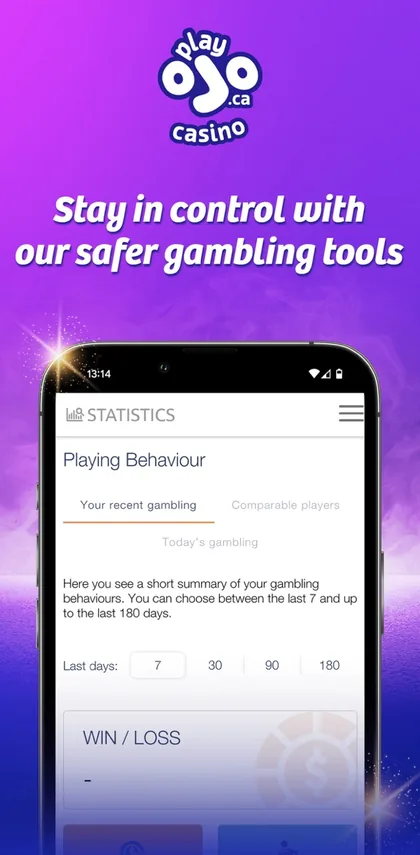
The app also shows your play in numbers. Under Review your play you get your game history and a spend-at-a-glance view, which is a quick reality check before you decide whether your limits still fit.
Not sure what numbers to type in? The planner below splits a monthly budget into weekly and daily caps and suggests a Game Status Reminder interval that matches your usual session.
Limit planner
- C$200monthly deposit limit
- C$46weekly deposit limit
- C$15daily deposit limit
- 45 minGame Status Reminder
Set these in My Account, Deposit Limits. A lower limit applies straight away, a higher one after 24 hours. Reminders come in 15, 30, 45 or 60 minutes.
The planner is a rough guide for your own budgeting. The limits you actually save in My Account are the ones that count.
PlayOJO cooling-off and temporary suspension
Sometimes you do not need a six-month lock, you just need the weekend off. That is what these two time-outs are for.
| Tool | Periods | Covers | Where |
|---|---|---|---|
| Cooling-off | 24h, 48h, 7 days | This account | OJO Safeguard |
| Temporary suspension | 30, 60, 90 days | This account | OJO Safeguard |
| Self-exclusion | 6 months minimum | Accounts on the licence | OJO Safeguard |
| Time Limit Control | Set minutes | Each session | Via support |
Swipe the table sideways to see every column.
Cooling-off is the gentlest option: 24 hours, 48 hours or 7 days, and it applies only to the account you set it on. I like it for the moments when you notice you are chasing, or you just had a big session and want to sleep on it. The temporary suspension is the same idea stretched to 30, 60 or 90 days, which is a proper break without the weight of a formal exclusion.
If what worries you is time rather than money, two tools help while you play. The Game Status Reminder, set in the Personal Area, pops up every 15, 30, 45 or 60 minutes with your time played, bets and payouts, and asks whether you want to continue or log out. Time Limit Control goes one step further and logs you out automatically after a number of minutes you choose. You switch it on by asking the support team on live chat.
Set your limits before you play
Set My LimitsHow PlayOJO self-exclusion works
This is the strongest tool on the list, and the one to reach for when a break is not enough.
You place it yourself
Self-exclusion lives in the OJO Safeguard section of My Account. You do not need to explain yourself to anyone or wait for approval.
Six months is the floor
The minimum PlayOJO self-exclusion period is 6 months. There is no one-week version of it, because shorter breaks already exist as cooling-off and suspension.
Longer or indefinite via support
If six months does not feel like enough, place the exclusion first, then contact support and ask for a longer period or an indefinite one.
Other accounts are covered
The exclusion applies to other accounts on the same licence, not just the one you are logged into. Opening a fresh account elsewhere on that licence is not a way around it.
No play, no deposits
While it runs you cannot gamble or deposit. That is exactly what makes it different from a deposit limit, which still lets you play inside a budget.
Marketing stops within 24 hours
You are removed from promotional messages, although this can take up to 24 hours. A message on the first day was most likely already on its way.
For Ontario players on playojo.ca, the same logic applies inside the regulated market, and offers in general only reach you on the site, in the app or through messages you agreed to receive. Once you self-exclude, that last channel closes too.
How to self exclude from PlayOJO, step by step in the app
The PlayOJO Canada app on iOS and the Android app carry the same safer gambling tools as the website. Here is the route I would follow.
Log in first
Open the app and sign in. The OJO Safeguard tools and live chat both sit behind your login.
Open My Account
Every safer gambling setting starts here, including Deposit Limits and the Personal Area.
Find OJO Safeguard
This is the home of cooling-off, temporary suspension and self-exclusion.
Pick the right tool
A night off, a month off or a six-month lock. Match the tool to how you actually feel, not how you hope to feel.
Choose and confirm
Select the period, read the summary once and confirm. From then on the block runs by itself.
Message live chat if needed
Ask for an indefinite exclusion, a longer period, Time Limit Control or a full account closure.
Menu wording can shift slightly between app updates. If a label looks different, the live chat team can point you to the right screen.
What players say about PlayOJO cooling-off and limits
Retold from what OJOers commonly mention about the safer gambling side of the site, good and less good.
- Common praise
Players like that deposit limits sit right in My Account and that lowering one works instantly. Nobody has to ask permission to spend less, and the daily, weekly and monthly caps are easy to combine.
- Mixed feelings
The 24 hour wait on raising a limit annoys some people in the moment. Most admit later that the delay is exactly what stopped a late-night top-up they would have regretted.
- Common wish
Some would prefer Time Limit Control as a switch in the menus rather than a request through live chat. The Game Status Reminder, which you set yourself, is the easy workaround.
My own take: the set of tools is complete, and the fact that every block can be placed without talking to anyone is what matters most. The chat-only extras are a small trade-off.
Where to get help in Canada
Tools inside a casino only go so far. If gambling is starting to weigh on you, these organisations and apps are the ones PlayOJO itself points to.
ConnexOntario
Free, confidential help for people in Ontario dealing with gambling, mental health or addiction. connexontario.ca
Responsible Gambling Council
A Canadian non-profit focused on preventing problem gambling, with practical guides for players and families. responsiblegambling.org
PlaySmart
Plain-language explanations of how games work, how odds work and how to keep play fun. playsmart.ca
Gambling Therapy
Free online support and advice for anyone affected by gambling, including family and friends. gamblingtherapy.org
Gamban
Blocking software that keeps gambling sites and apps off your devices, a solid second layer next to self-exclusion. gamban.com
Net Nanny
Content filtering you can use to block gambling pages on shared or family devices. netnanny.com
Start with the self-assessment. The PlayOJO test takes under a minute and needs no login. Two or more yes answers mean it is time to talk to one of the organisations above, and placing a PlayOJO self-exclusion at the same time is a sensible first step.
If you are ready to set things up properly, log in to PlayOJO and open OJO Safeguard. You can also read how the licence and security side works on our PlayOJO safety guide.
PlayOJO Self-Exclusion FAQ
How do I self exclude from PlayOJO?
Log in, open My Account and go to the OJO Safeguard section. Choose self-exclusion, pick your period and confirm. The shortest option is 6 months. If you want longer or an indefinite exclusion, send a message to the live chat team right after you place it and they will extend it for you.
What is the PlayOJO cooling-off period?
Cooling-off is a short break of 24 hours, 48 hours or 7 days. It locks only the account you set it on, so it suits a moment when you simply want to step away for a night or a week. For a longer pause, the temporary suspension runs for 30, 60 or 90 days.
How does the PlayOJO deposit limit work?
You can set a daily, weekly and monthly limit in My Account under Deposit Limits. They work independently, so one, two or all three can be active at once. Lowering a limit takes effect immediately. Raising one only kicks in after 24 hours, which gives you a day to change your mind.
How do I close my PlayOJO account?
Open live chat after logging in and ask the team to close your account. Closing is not the same as self-exclusion. It simply ends that account, while self-exclusion is a protective block of at least 6 months that also reaches other accounts on the same licence. If gambling is the reason, choose self-exclusion.
Can I take a break from PlayOJO in Canada without closing my account?
Yes. Cooling-off gives you 24 hours, 48 hours or 7 days, and a temporary suspension gives you 30, 60 or 90 days. Your account stays open and you come back to it when the period ends. Both apply to that one account only, so they are the lighter options.
Will PlayOJO stop sending me offers when I self-exclude?
Yes. Self-excluded players are taken off marketing lists, but the removal can take up to 24 hours to go through. If a message lands during that first day, it was already queued. After that the inbox should go quiet for the whole exclusion period.
Can I set a time limit on PlayOJO?
Two tools help with time. The Game Status Reminder pops up every 15, 30, 45 or 60 minutes with your time played, bets and payouts, and you set it in the Personal Area. Time Limit Control logs you out after a set number of minutes and is switched on by asking support.
Keep reading

Play on your own terms
Set a deposit limit and a Game Status Reminder first, then enjoy the lobby knowing the brakes are already in place.